When you think of creating a responsive website you likely think about using media queries and breakpoints for styling. While this works well, using this technology has its limitations. Media queries are only able to target elements based on viewport size, whether than be defined using pixels, ems, or rems. However, a new technology that addresses these limitations has recently been developed and has become stable across all modern web browsers. This technology is known as container queries. Using container queries, you can target the size and style of a parent to create responsive style changes in the corresponding child elements. This improves responsiveness by making styling more targeted and flexible. Unfortunately, style queries are not as well supported as container queries.
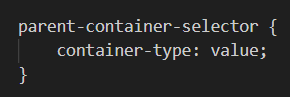
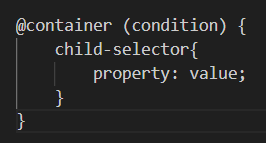
So, how do you use these technologies? Container queries must first be built by setting a container-type style on the parent. @container can then be used as well as breakpoints provided in parentheses that determine when the defined styles should be applied. Styling queries work alongside container queries. The effect of using style queries is further specification when applying styles to children of a parent container. When targeting the styles of the parent using style queries, the container, and the style property are used yet the container does not need to first be built. The format of a style query is as follows. @container is followed by style and a set of parentheses that identify styles coded into the HTML for the container, This is followed by brackets that contain optional selectors for further specificity and the styles to be applied.
As previously mentioned, in order to use a container query you need to first bult the container by assigning it a container type. Listed bellow are the most common value options for this property.
- normal : the inital value
- size : defines size based on inline a block elements
- inline-size : defines size based on the online axis